
Last Updated on December 21, 2025
Sometimes I wondered why we struggle so much with sensors like DHT11 or DHT22 on ESP 01s module to get the weather data. Limited GPIO pins, timing issues, pull up resistors, boot problems and everything becomes complicated very quickly then I got a simple idea, Instead of measuring temperature and humidity locally using indoor sensors, Why not fetch real time weather data from the internet and display it on a OLED?
May be I don’t know! this approach is actually more accurate, more stable for outdoor measurement, when working with ESP 01 module.
Lets build an ESP 01 (or) ESP 01s based online API weather display. Here we used weatherAPI (https://www.weatherapi.com/) and SSD1306 I2C OLED display. For this project you need to have WiFi and account in weatherAPI, We going to code ESP 01 to refresh every 1 minute or more to use limited API call so mostly its free for limited call per day or month.
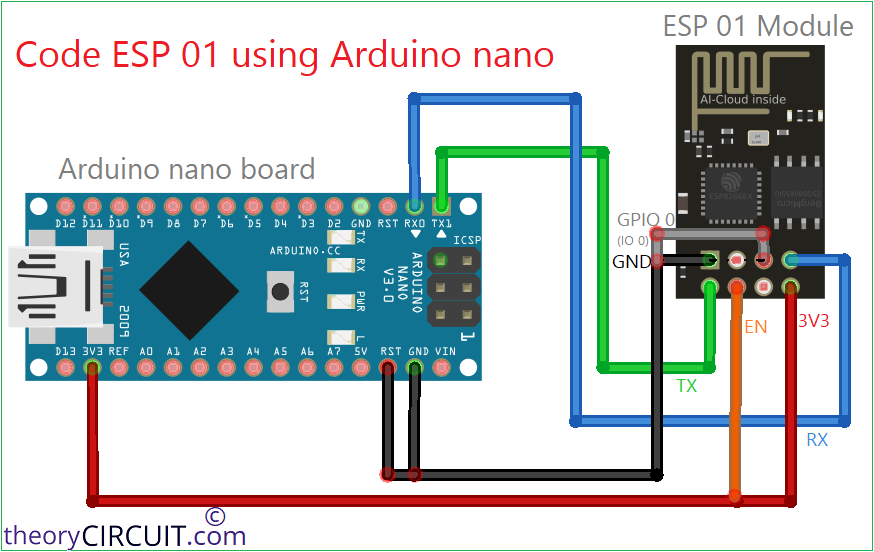
ESP 01 or ESP 01s module with only ESP8266 Microcontroller needs external USB to Serial (TTL) converter for to upload code, either you can use if you have one or you can use any microcontroller development board with USB to Serial converter, here we used Arduino Nano board.
ESP 01 Program Mode Wiring

Working Video
ESP 01 Online API mini Weather Station Code
#include <ESP8266WiFi.h>
#include <ESP8266HTTPClient.h>
#include <Wire.h>
#include <Adafruit_GFX.h>
#include <Adafruit_SSD1306.h>
#include <ArduinoJson.h>

/* -------- OLED -------- */
#define SCREEN_WIDTH 128
#define SCREEN_HEIGHT 64
#define OLED_RESET -1
Adafruit_SSD1306 display(SCREEN_WIDTH, SCREEN_HEIGHT, &Wire, OLED_RESET);

/* -------- I2C -------- */
#define SDA_PIN 0
#define SCL_PIN 2

/* -------- WiFi -------- */
const char* ssid = "Your WiFi SSID";
const char* password = "Your WiFi Password";

/* -------- WeatherAPI -------- */
String city = "London";
String apiKey = "4cc*81a90***********125*******2"; // Paste the API Key from https://www.weatherapi.com/my/

unsigned long lastUpdate = 0;
const unsigned long updateInterval = 60000; // 1 minute

void setup() {
  Wire.begin(SDA_PIN, SCL_PIN);

  display.begin(SSD1306_SWITCHCAPVCC, 0x3C);
  display.setTextColor(WHITE);
  display.setTextSize(1);
  display.clearDisplay();

  display.setCursor(0, 0);
  display.println("ESP-01S Weather");
  display.println("Connecting WiFi...");
  display.display();

  WiFi.begin(ssid, password);
  while (WiFi.status() != WL_CONNECTED) {
    delay(500);
  }

  display.clearDisplay();
  display.println("WiFi Connected");
  display.display();
  delay(1500);
}

void loop() {
  if (millis() - lastUpdate > updateInterval) {
    lastUpdate = millis();
    fetchWeather();
  }
}

void fetchWeather() {
  if (WiFi.status() != WL_CONNECTED) return;

  WiFiClient client;
  HTTPClient http;

  String url = "http://api.weatherapi.com/v1/current.json?key=" +
               apiKey + "&q=" + city + "&aqi=no";

  http.begin(client, url);
  int httpCode = http.GET();

  if (httpCode == 200) {
    String payload = http.getString();

    StaticJsonDocument<768> doc;
    deserializeJson(doc, payload);

    float temp = doc["current"]["temp_c"];
    int humidity = doc["current"]["humidity"];
    const char* condition = doc["current"]["condition"]["text"];

    display.clearDisplay();
    display.setCursor(0, 0);

    display.println(city);
    display.println("----------------");

    display.print("Temp: ");
    display.print(temp);
    display.println(" C");

    display.print("Hum : ");
    display.print(humidity);
    display.println(" %");

    display.println();
    display.println(condition);

    display.display();
  }

  http.end();
}
After upload done make the following Run mode wiring for ESP 01 and SSD1306 display.
ESP 01 SSD1306 API Mini Weather Station Run Mode Wiring
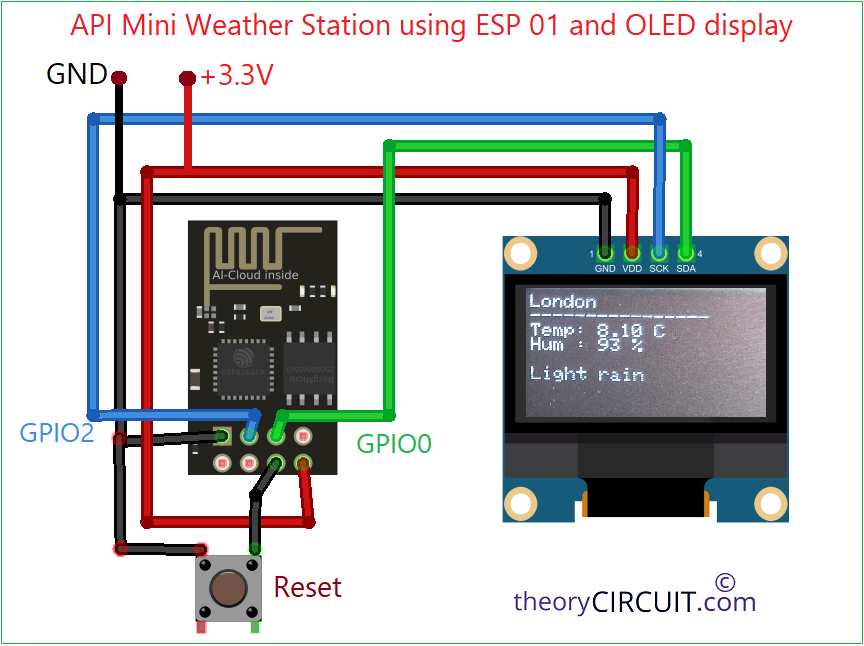
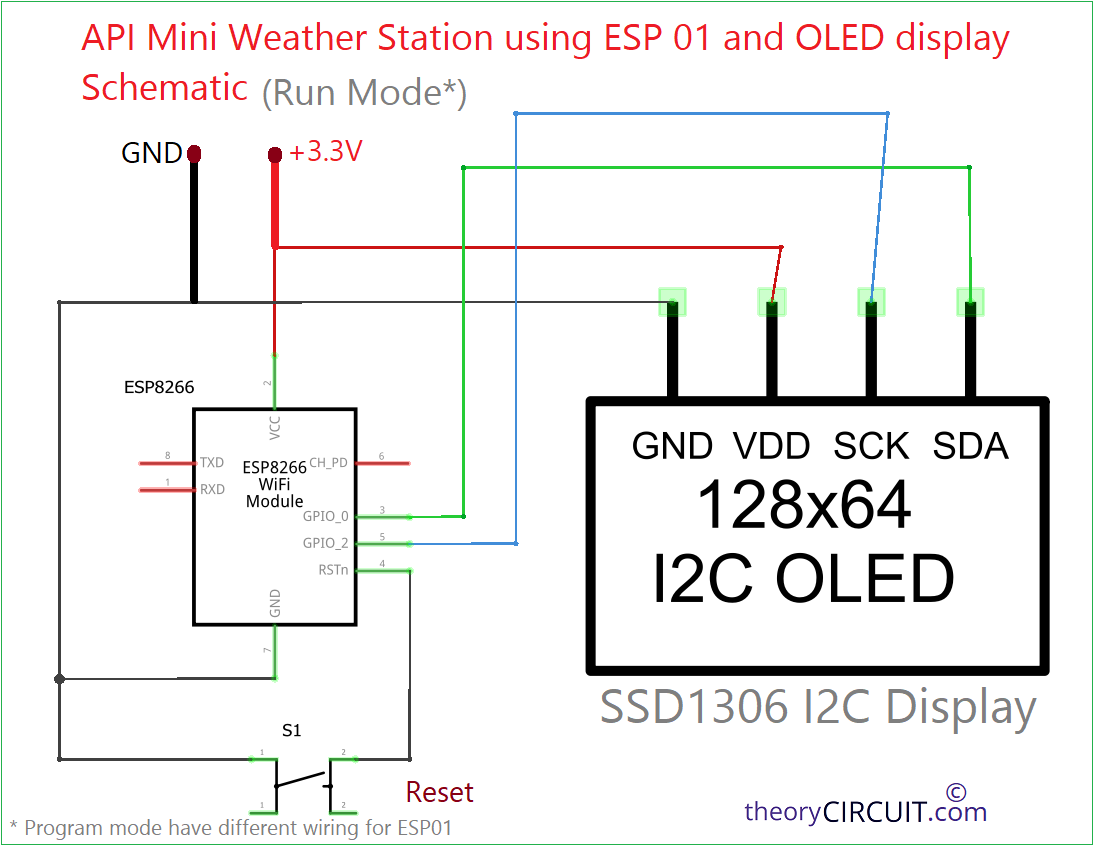
Use stable 3.3V DC power supply for ESP01 and SSD1306 OLED Display and keep WiFi credential & API Key correct and avoid HTTPS on ESP 01 unless required. Here use long interval for refresh and weather data may not change every minute so longer intervals reduce API calls and you can stay in free tier.