
Last Updated on January 12, 2026
HC SR04 Ultrasonic Sensor is very popular among electronics makers and engineers, we can use it in distance measurement, obstacle detection, water level sensor and for robotics etc., Here is the simple way to interface the HC SR04 ultrasonic sensor with ESP32 and Display the measured distance value on an SSD1306 OLED display using I2C communication method. Before that lets understand HC SR04,
HC SR04 Ultrasonic Sensor
There are different types of distance sensor available in the market but when I first started experimenting with distance measurement sensors, I found that HC-SR04 ultrasonic sensor was the easiest and most affordable option available. Even today you can check, hc sr04 is one of the easily available and most commonly used sensors in beginner and intermediate electronics projects. It offers simple interface through only four pins and decent accuracy for short distance, and then works with almost any microcontroller like Arduino, ESP8266, ESP32, PIC, STM32, you name it.
HC SR04 ultrasonic distance sensor is used for measuring the distance using sound waves beyond the range of hearing. The sensor uses ultrasound, which is a very high frequency sound wave, that is frequency at 40KHz to measure distances. By sending out ultrasound and measuring how long it takes to receive the reflected signal off an object, the distance can be calculated by measuring the time since speed of sound in air is approximately 1,126 ft/sec (344 m/s). Therefore the fundamental principle of operation for this device is Time for an ultrasonic pulse to return = Distance.
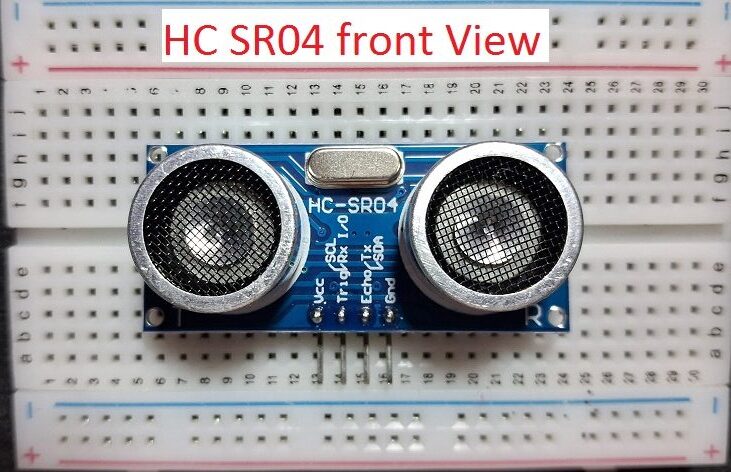
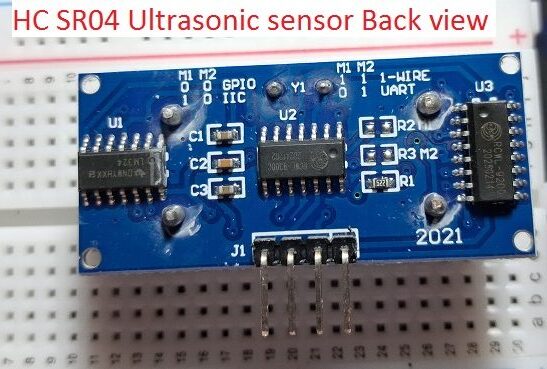
HC SR04 have two circular units on the front side.
- Ultrasonic Transmitter
- Ultrasonic Receiver
Microcontroller sends a 10 µs HIGH pulse to the TRIG pin and then HC-SR04 emits 8 ultrasonic bursts at 40 kHz, hence this Sound wave travels through air and hits an object if present in the detecting range and Echo reflects back and it is received by the receiver unit, ECHO pin goes HIGH for the duration of sound travel time Microcontroller measures the HIGH pulse width on ECHO pin and then Distance is calculated using time value.
Distance (cm) = (Time in microseconds × 0.034) / 2
Simple Distance value measurement and printing in Serial Monitor
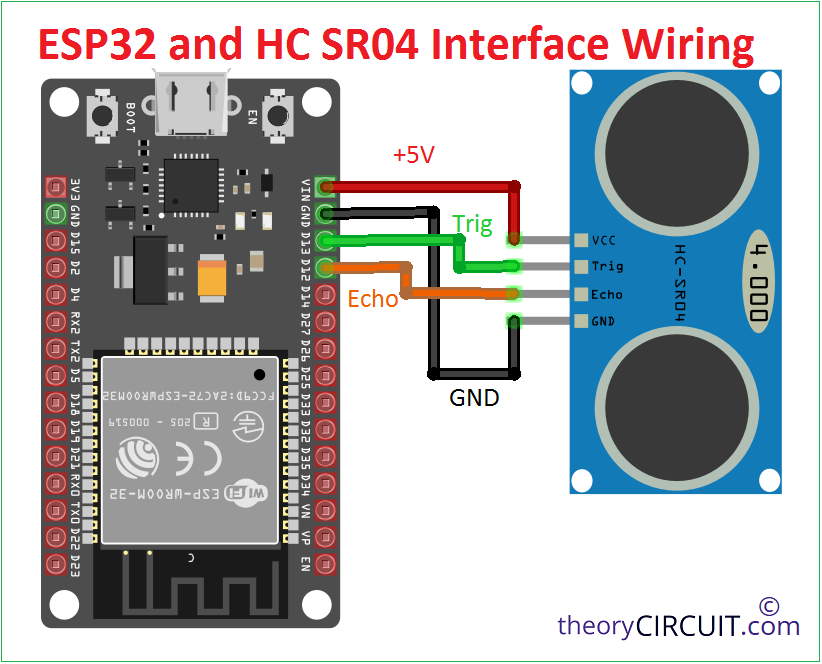
Here the ultrasonic sensor hc sr04 connected with ESP32 microcontroller as shown in the wiring diagram and then Arduino code is uploaded through Arduino IDE, After succesfull upload, you can see the serial monitor printing distance value, place hand on any object in front of hc sr04 and it will read the distance and makes it appear on the serial monitor.
Code to see Distance sensed Value serial monitor
#define TRIG_PIN 13
#define ECHO_PIN 12

long duration;
float distance;

void setup() {
  Serial.begin(115200);

  pinMode(TRIG_PIN, OUTPUT);
  pinMode(ECHO_PIN, INPUT);

  Serial.println("ESP32 + HC-SR04 Ultrasonic Sensor");
}

void loop() {
  // Clear TRIG
  digitalWrite(TRIG_PIN, LOW);
  delayMicroseconds(2);

  // Send 10us pulse
  digitalWrite(TRIG_PIN, HIGH);
  delayMicroseconds(10);
  digitalWrite(TRIG_PIN, LOW);

  // Read echo duration
  duration = pulseIn(ECHO_PIN, HIGH, 30000); // 30ms timeout

  if (duration == 0) {
    Serial.println("Out of range");
  } else {
    distance = (duration * 0.034) / 2;
    Serial.print("Distance: ");
    Serial.print(distance);
    Serial.println(" cm");
  }

  delay(1000); // 1 second delay
}
Interfacing ESP32, HC SR04 to display distance in SSD1306 I2C OLED Display
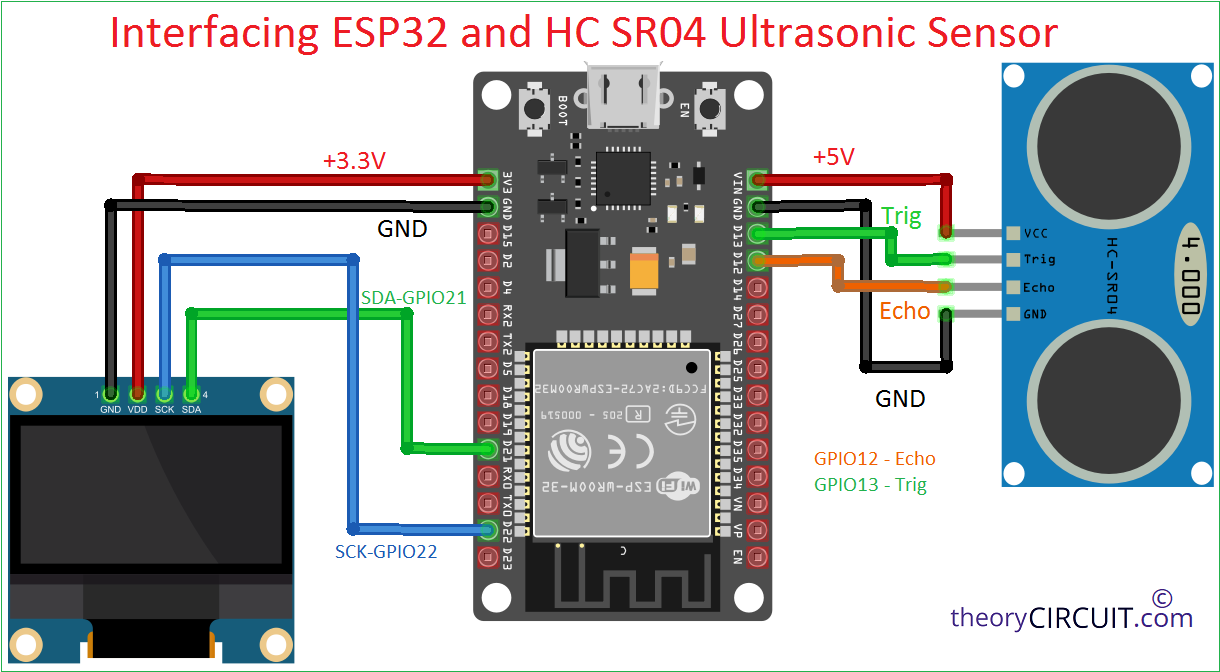
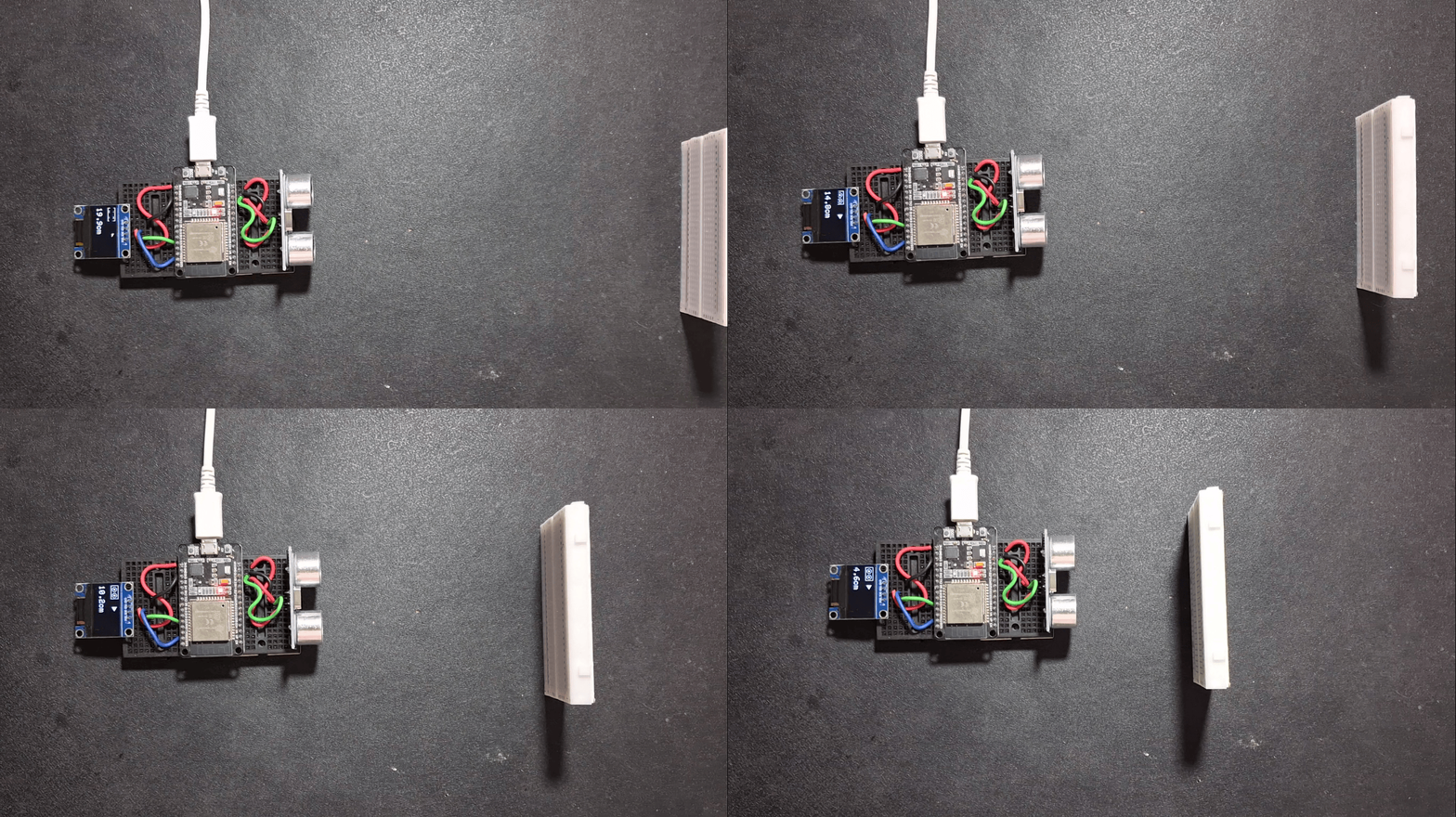
make the wiring as shown in the wiring diagram and the upload the following code using Arduino IDE, if you are new to use ESP32 with Arduino IDE then read here.
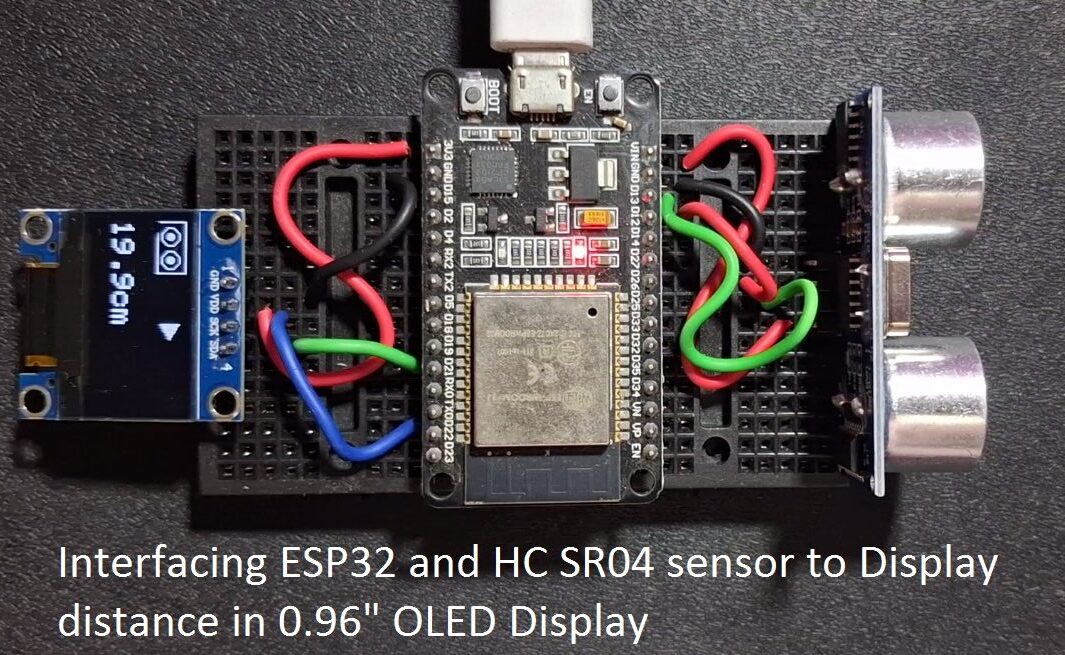
Code to display distance in OLED Display
#include <Wire.h>
#include <Adafruit_GFX.h>
#include <Adafruit_SSD1306.h>

#define SCREEN_WIDTH 128
#define SCREEN_HEIGHT 64
#define OLED_RESET -1
#define OLED_ADDR 0x3C

Adafruit_SSD1306 display(SCREEN_WIDTH, SCREEN_HEIGHT, &Wire, OLED_RESET);

// HC-SR04 pins
#define TRIG_PIN 13
#define ECHO_PIN 12

long duration;
float distance;

// ---------- HC-SR04 SYMBOL ----------
void drawHCSR04Icon(int x, int y) {
  display.drawRect(x, y, 36, 20, SSD1306_WHITE);
  display.drawCircle(x + 10, y + 10, 6, SSD1306_WHITE);
  display.drawCircle(x + 26, y + 10, 6, SSD1306_WHITE);
  display.fillCircle(x + 10, y + 10, 2, SSD1306_WHITE);
  display.fillCircle(x + 26, y + 10, 2, SSD1306_WHITE);
}

// ---------- OBSTACLE ----------
void drawObstacle(int x, int y) {
  display.fillTriangle(
    x, y,
    x + 10, y + 6,
    x, y + 12,
    SSD1306_WHITE
  );
}

void setup() {
  Serial.begin(115200);

  pinMode(TRIG_PIN, OUTPUT);
  pinMode(ECHO_PIN, INPUT);

  Wire.begin(21, 22);

  if (!display.begin(SSD1306_SWITCHCAPVCC, OLED_ADDR)) {
    while (1);
  }

  display.clearDisplay();
  display.setTextColor(SSD1306_WHITE);
}

void loop() {
  // Trigger ultrasonic pulse
  digitalWrite(TRIG_PIN, LOW);
  delayMicroseconds(2);
  digitalWrite(TRIG_PIN, HIGH);
  delayMicroseconds(10);
  digitalWrite(TRIG_PIN, LOW);

  duration = pulseIn(ECHO_PIN, HIGH, 30000);

  display.clearDisplay();

  if (duration == 0) {
    display.setTextSize(1);
    display.setCursor(0, 48);
    display.print("No object detected");
  } else {
    distance = (duration * 0.034) / 2;
    distance = constrain(distance, 2, 50);

    Serial.print("Distance: ");
    Serial.print(distance);
    Serial.println(" cm");

    // Draw sensor symbol
    drawHCSR04Icon(0, 0);

    // Map distance to triangle X position
    int obstacleX = map(distance, 2, 50, 45, 118);
    obstacleX = constrain(obstacleX, 45, 118);

    drawObstacle(obstacleX, 4);

    // Distance text (same screen)
    display.setTextSize(2);
    display.setCursor(0, 36);
    display.print(distance, 1);
    display.print("cm");
  }

  display.display();
  delay(150);
}