Last Updated on October 5, 2026
Let’s build simple ESP32 text to speech device that works completely offline with SAM speech synthesizer. You may know that most text to speech device send your text to a cloud service such as Google TTS, Amazon polly or Azure then gets mp3 file and then play it.
Those device works but they need wifi, an API key and working internet connection. Here we are going to build a device the other way. ESP32 will convert text into speech entirely by itself, with no internet, no cloud and no subscription. For the speech engine we will use SAM (software automatic mouth). Here SAM is a very small rule based speech synthesizer that was originally written for the commodore 64 in the early 80’s. It runs comfortably on ESP32 by using the ESP8266 SAM library by Earlephilhower.
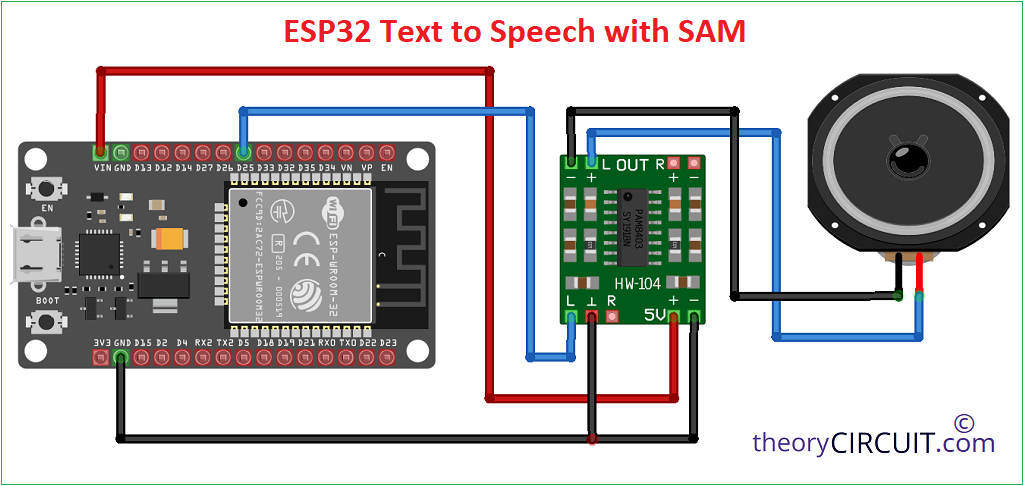
Here for the audio output we will use the cheap and popular PAM8403 amplifier module. You know that PAM8403 is an analog amplifier so instead of I2S, we will use the built in DAC of the ESP32 (GPIO25) to feed it.
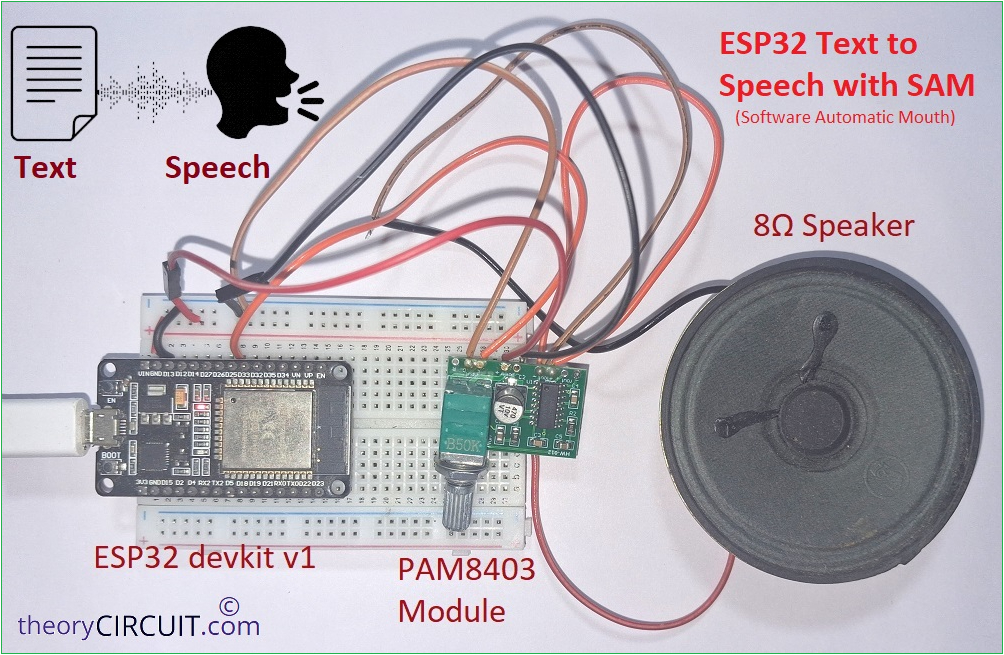
Here i want to be honest about what to expect. The output voice from the speaker is Robotic and Retro and the ESP32 internal DAC is only 8 bit so there will be a little background hiss. But when we use it for alarms, sensor readout, talking clocks and instruments. That output will be more realistic and related and also capable of work 100% offline.
Prototype
What Does offline Text to Speech mean?
In simple words, offline text to speech system (TTS System) does two works. 1. Text Analysis that is converts text into phonemes, the basic sound units of a language, for example “hello” becomes something like “HH EH L OW” (i think you are read it in robotic sound!). 2. Speech Synthesis that is converts those phonemes into an audio waveform.
In the online TTS system both works are happen on a server. In a offline TTS system both happen on the microcontroller itself. Since the ESP32 has only a few hundred KB of RAM, so the TTS engine must be tiny and here the SAM is exactly that.
Circuit Diagram
Required Components
- ESP32 Devkit V1
- PAM8403 Module (Audio Amplifier)
- 8Ω Speaker
- Connecting wires
- USB A to Micro USB Data cable (to program ESP32 from computer)
Required Tools & Libraries
- Arduino IDE
- ESP32 board package (If you are new to use ESP32 with Arduino then read here)
- ESP8266Audio library (Library Manager)
- ESP8266SAM library (download the ZIP from the Earle Philhower GitHub repository and then add it to the Arduino library as zip)
Working Video
How it Works?
Text input that given to the ESP32 microcontroller goes to the firmware which contains SAM (phonemes + formant synthesis) and then gets out as digital audio signal and then gets into AudioOutputI2S library and gets converted into Analog audio signal (ESP32 DAC GPIO25 & GPIO26) here we pick audio signal from GPIO25 and feed into PAM8403 Audio amplifier then the audio signal amplified and reach speaker and we hear the speech sound.
Steps to follow
Step 1: Install the ESP32 board package in the Arudino IDE. Go to tools then board then boards manager then search for ESP32 and install package by Espressif systems.
Step 2: InstallESP8266Audio library. Go to Sketch then Include Library then Manage Libraries and then search for ESP8266Audio and install it.
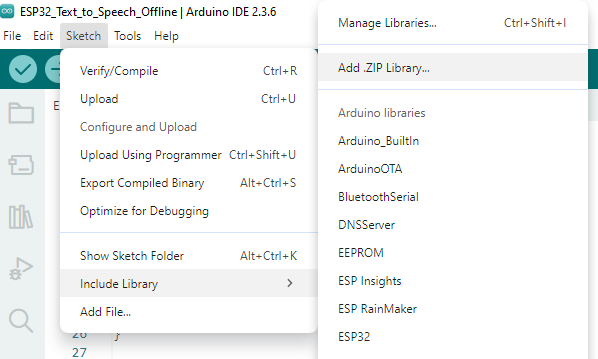
Step 3: InstallESP8266SAM. Download the ESP8266SAM repository (author: earlephilhower) as a ZIP and add it with Sketch then Include Library then Add .ZIP Library.
Step 4: Wire the circuit as shown in the circuit diagram.
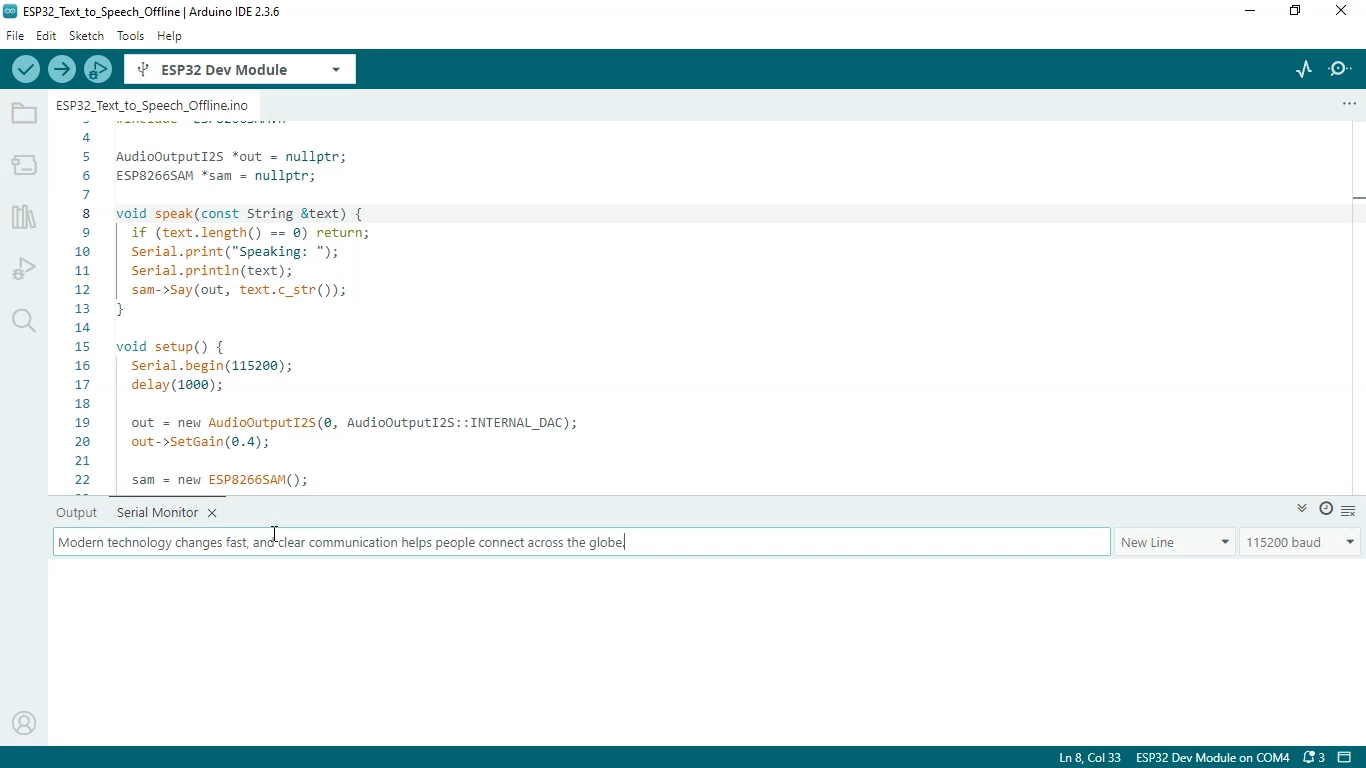
Step 5: Choose ESP32 Dev Module and the correct COM port (After connecting ESP32 board with computer). Then upload the following code, then hear speaker say “ready” then type text and enter in the serial monitor then hear it keep in mind that serial monitor must be set at 115200 baud.
Arduino Code for ESP32 Text to Speech Offline
#include <Arduino.h>
#include "AudioOutputI2S.h"
#include "ESP8266SAM.h"

AudioOutputI2S *out = nullptr;
ESP8266SAM *sam = nullptr;

void speak(const String &text) {
  if (text.length() == 0) return;
  Serial.print("Speaking: ");
  Serial.println(text);
  sam->Say(out, text.c_str());
}

void setup() {
  Serial.begin(115200);
  delay(1000);

  out = new AudioOutputI2S(0, AudioOutputI2S::INTERNAL_DAC);
  out->SetGain(0.4);

  sam = new ESP8266SAM();

  Serial.println("Type text and press Enter.");
  speak("Ready");
}

void loop() {
  if (Serial.available()) {
    String text = Serial.readStringUntil('\n');
    text.trim();
    speak(text);
  }
}
Screenshot